Showing posts with label utilities. Show all posts

Software: CC Cleaner 2.26


CCleaner is a freeware system optimization, privacy and cleaning tool. It removes unused files from your system - allowing Windows to run faster and freeing up valuable hard disk space. It also cleans traces of your online activities such as your Internet history. Additionally it contains a fully featured registry cleaner. But the best part is that it's fast (normally taking less than a second to run) and contains NO Spyware or Adware! :)

Features:
· Added support to clean Windows DNS cache.
· Added vacuum SQLite databases for Firefox and Google Chrome.
· Added publisher and version to Uninstall tool.
· Added Taskbar jump list tasks for Windows 7.
· Added Taskbar Progress for Windows 7.
· Improved Exclude list registry keys addition functionality in 64bit Windows 7.
· Improved Registry Cleaner detection algorithm and 64-bit file system redirection.
· Improved "Save to text file" functionality in Cleaner screen.
· Improved system tray icon activation and tooltip.
· Improved Registry screen "fix selected issues" dialog usability by removing prompt.
· Further improved RECURSE and REMOVESELF functionality.
· Improved Uninstall screen detection algorithm.
· Improved memory usage to avoid GDI leaks.
· Fixed issue with Sticky Notes being detected as Missing startup item.
· Fixed "Edit" and "Remove" button availability on Include/Exclude screen.
. Cleans IE, Firefox, Chrome, Opera, Safari, Registry, third-party apps.

Sponsor:
1- CC Cleaner

Download:
1- CC Cleaner 2.26 (Portable)(Mediafire)


Download Software: CC Cleaner 2.26

Software: Your Uninstaller 6.3 (6.3.2009.12)


Do you have programs you just can't seem to get rid of?

You've probably encountered some stubborn programs that just won't uninstall at all or uninstall completely, right? And, more often than not, when you use the Windows Add/Remove Program utility, there are remnants or "artifacts" of the program left behind in the system registry and on your hard drive that are no longer needed. These useless items will bog your PC down and, over time, it will get slower and slower lugging around this useless baggage - unexpected errors and frequent crashes may also occur because of this!

Here's the problem:
Let's say you frequently install trial versions of programs to check them out. And let's also say that, after giving them a shot, you don't like them and decide to uninstall them. Unfortunately, you find it impossible to uninstall some of them - they remain on the Windows installed programs list even they are "supposedly" gone. These improperly uninstalled programs can also be the cause of errors because many junk files and registry keys/values were left behind on your PC. These 'junk artifacts' can - and do - cause system problems and slow down Windows substantially.

Here's the solution:
Your Uninstaller! will solve these problems. It removes any installed program and clears all the left-behind traces - no more 'junk artifacts' remaining. Whenever you uninstall a program, Your Uninstaller! removes it completely! There's absolutely nothing left behind.

Uninstall any installed program completely, even corrupted ones.

Fix invalid uninstalls in one click
Full system scan after a program is uninstalled for complete removal.
Force removal of a program.
Easy to Use. No expert knowledge required.
Keep your system stable and clean with various system tools.
Windows Vista and Windows 7 Compatible.
Safe and Trusted.

Platforms: Windows 7, Vista, XP, Me, 98 and 2000
3.80 MB

Sponsor:
1- Your Uninstaller

Download:
1- Your Uninstaller 6.3.2009.12 (Mediafire)
Download Software: Your Uninstaller 6.3 (6.3.2009.12)

Software: Acronis True Image Home 2010


With Acronis True Image Home 2010, rest assured that all your important data including images, music, documents and applications are well protected and can easily be recovered in the event of any disaster.

Easy and Fast Backup and Recovery:
Acronis True Image Home 2010 provides home users reliable and timeless backup and recovery of their operating system, applications, settings and personal files.

Friendly, Windows®-style User Interface:
From an intuitive graphical interface, you can easily define where, locally or online, and how often to backup a PC based on your needs.

Acronis Online Backup™ to a secure location:
Optional Acronis online storage services are available to automatically backup valuable data or files over the internet to a secure location.

Continuous data protection:
In addition, Acronis Nonstop Backup™ provides continuous system and data protection, preventing data loss

Serial:
GBQQ8EXJ-DQBZWY84-C7PKVGXH-V745AMTC-JAA96T5F-E44AZP6V-Y2T8MXNG-NH5XWYDJ
H8B7N2WR-EWYZNP7N-XGP6A5N3-BLLWM2N7-QURDRAWK-HH35ECAR-29JC8GP5-BQ5XZFJE

Sponsor:
1- Acronis softwares

Download:
1- Acronis True Image Home 2010 (Mediafire)

Download Software: Acronis True Image Home 2010

Software: Diskeeper 2010 Professional


Get the peak system performance you need to meet the demands of today’s busy computers.

Diskeeper® 2010 Professional edition performance software not only prevents the majority of fragmentation before it can happen, it includes advanced network management capabilities, critical system file protection and file optimization for lightning fast response times.

IntelliWrite:
IntelliWrite™ fragmentation prevention technology prevents up to 85% of the fragmentation every system suffers from. It intelligently writes contiguous files to the disk so system resources are not wasted creating fragmentation. The results? A whole new level of system speed and efficiency.

InvisiTasking
Diskeeper is the only defragmenter with InvisiTasking® technology, a real-time background processing technology that allows Diskeeper 2010 to defragment your system as fragmentation occurs, even during heavy traffic times — without using active system resources. InvisiTasking eliminates the need for scheduling and administrator attention.

i-Faast:
Diskeeper 2010 I-FAAST® 2.0 (Intelligent File Access Acceleration Sequencing Technology) accelerates file access times to meet the heavy workloads of file-intensive applications. Utilizing a specially formulated technology, I-FAAST closely monitors file usage and organizes the most commonly accessed files for the fastest possible access, up to 80% faster.

Save Energy Cost:
PCs with Diskeeper run more efficiently saving corporations thousands of dollars in energy costs each year. Diskeeper can save an estimated $3.22 per PC per year in energy costs. It makes bottom line dollars and cents to install Diskeeper on every PC on your network.

** Compatible with Windows® 7

Sponsor:
1- Diskeeper 2010 Professional, Pro Premier, Server, Enterprise Server

Download:
1- Diskeeper 2010 Professional (Depositfiles) (TurboIt) (Mediafire)


Download Software: Diskeeper 2010 Professional

Software: TuneUp Utilities 2010


TuneUp Utilities can make your Windows operating system faster, more comfortable and more secure with just a few mouse clicks. And all operations performed on the operating system are completely safe, because all changes are monitored by TuneUp Rescue Center and can be undone at any time. AllTuneUp Utilities modules can be accessed through a common interface that is divided into six categories. The software helps both beginners and experts to make Windows meet their needs in a way that is better, easier and safer. All important system options are explained in an easy way and can be turned on or off at the click of your mouse.TuneUp Utilities will then make the necessary changes in the registry or boot files automatically. We place a high value on system stability, so that Windows won't stop working reliably. And most changes that you make can be undone in TuneUp Rescue Center - easily and safely.

Maintain system
Keep your PC in top shape: With only one click, you maintain your computer and provide more stability.

Increase performance
Get the maximum from your PC and experience top speed for your work and games.

Fix problems
As easy as pie: Solve Windows problems quickly, easily, and reliably or restore deleted files.

Customize Windows
Give your Windows a new look: cool new boot screens, icons, and animations — free for downloading.

NEW! Turbo Mode
Disable unneeded processes and concentrate all the PC processing power on your active program!

NEW! Live Optimization
Accelerate the startup and response times of your programs — for optimal PC performance!

Sponsor:
1- Tuneup Utilities 2010

Download:
1- TuneUp Utilities 2010 (Mediafire)


Download Software: TuneUp Utilities 2010

Software: O&O Defrag 12 Professional Edition


Fragmented hard disks put the brakes on your PC! Fragmentation can drastically slow down your computer. But the situation is not hopeless: O&O Defrag is the perfect remedy! Defragmentation rearranges the individual data fragments and writes them contiguously on the hard disk. This is really the only way for your computer to regain its original power and performance.

O&O Defrag 12, however, goes one step further. All your system's files will be sorted according to their level of use, and each one will be separated into its own section of the hard disk (drive zones). O&O Defrag 12 introduces 3 new defragmentation methods that can also apply a user-defined classification of files to perfectly complement all previous methods.
O&O Defrag 12 is everything superior defragmentation software should be: it gives you fully automatic defragmentation for the home user as well as expert-level professional setting options.

Features:
-fully compatible with Microsoft Windows 7,Vista, and XP
-zone filing for optimal organization of files
-three additional defragmentation methods (eight methods in all)
-Improved: even better at eliminating high levels of fragmentation
-Background monitoring: your system is constantly kept at its peak
-Screen Saver Mode: optimizes your PC whenever it’s not being used
-O&O OneClickDefrag for fully automatic configuration
-Job Assistant for scheduling defragmentation

Operating System: Windows™ 2000, XP, Vista, Windows 7
Languages: English, German, French

Sponsor:
1- O&O Defrag 12 and other defragmenter/utilities


Download:
1- O&O Defrag 12 Professional Edition (Mediafire)


Download Software: O&O Defrag 12 Professional Edition

Software: Sandboxie 3.4


"Browse the Web securely ,keep browser's functionality for active content." Sandboxie runs your programs in an isolated space which prevents them from making permanent changes to other programs and data in your computer.

Benefits of the Isolated Sandbox:
* Secure Web Browsing: Running your Web Browser under the Protection of Sandboxie means that all malicious software downloaded by the browser is trapped in the sandbox and can be discarded trivially.
* Enhanced Privacy: Browsing history, Sandboxie runs your programs in an isolated space which prevents them from making permanent changes to other programs and data in your computer.

Benefits of the Isolated Sandbox:
* Secure Web Browsing: Running your Web browser under the protection of Sandboxie means that all malicious software downloaded by the browser is trapped in the sandbox and can be discarded trivially.
* Enhanced Privacy: Browsing history, cookies, and cached temporary files collected while Web browsing stay in the sandbox and don't leak into Windows.
* Secure E-mail: Viruses and other malicious software that might be hiding in your email can't break out of the sandbox and can't infect your real system.
* Windows Stays Lean: Prevent wear-and-tear in Windows by installing software into an isolated sandbox.
* Secure E-mail: Viruses and other malicious software that might be hiding in your email can't break out of the sandbox and can't infect your real system.
* Windows Stays Lean: Prevent wear-and-tear in Windows by installing software into an isolated sandbox.

Sponsor:
1- Sandboxie software

Download:
1- Sandboxie 3.4 (Mediafire)


Download Software: Sandboxie 3.4

Software: Internet Download Manager (IDM) 5.18 (Build 4)


General Ratings (Computer Reals: http://www.computer-realm.net/internet-download-manager-idm-review/) ;
Interface – 4/5
Ease of use – 5/5
Memory Usage – 5/5
Popularity – 4.5/5
Price($29.95) – 3.5/5
No. of bugs – 4/5

Software specific ratings
Download acceleration(upto 600%) – 5/5
Maximum no. of download streams(16) – 5/5
Compatibility – 4/5
Bandwidth cooperation – 5/5

Note:
Please uninstall the previous IDM version before proceed to the installation for IDM v5.18 (build 4). Click the .exe and then nothing will happens? In a blink of eye, you will see the IDM shortcut appear on your desktop, your installation is then considered completed.

Sponsor:
1- Internet Download Manager and other download accelerator software

Download:
1- Internet Download Manager (IDM) 5.18 (Build 4) (Silent Install) (Mediafire)

Extra:
2- IDM Native language add-on: Click here

Download Software: Internet Download Manager (IDM) 5.18 (Build 4)

Software: PerfectDisk 10 Professional Defragmenter


Run your workplace at maximum efficiency. PerfectDisk 10 Professional's innovative defragmenting features improve performance of desktops and laptops to increase productivity and maximize your hardware investments.

Features:
1- Patented SMARTPlacement™ – A Smarter Defragmenting Process
2- Complete Free Space Consolidation
3- AutoPilot Scheduling
4- Defrag During System Idle Times with Automatic StealthPatrol™
5- Single-pass Defrag
6- Selected Files Defrag
7- Space Management
8- Full-Scale Central Management Options

System Requirements:
OS: Windows 7, Vista, XP, 2000 Professional

Sponsor:
1- Perfectdisk

Download:
1- PerfectDisk 10 Professional Defragmenter (Build 100) (Mediafire link)

Download Software: PerfectDisk 10 Professional Defragmenter

Software: Iolo System Mechanic 9.0.3.3 Professional

Make your PC run like new again

Windows gets slower from file fragments, registry errors, and sneaky new startup items. System Mechanic reverses this "aging" and can even make your PC run faster than when it was new, because many new PCs are not optimized for speed to begin with.

Features:
* Cleans, defrags, & repairs registry
* Accelerates PC startup 19 ways
* Defrags & recovers orphaned RAM
* Boosts internet speed
* Complete low-level drive defrag
* Turns off unused background programs
Perform dozens of performance boosting optimizations in one step.


System Requirements:
OS: Windows Vista, XP

Sponsor:
1- System Mechanic 9 and more

Download:
1- System Mechanic 9.0.3.3 Professional (Mediafire link)
Download Software: Iolo System Mechanic 9.0.3.3 Professional

Software: Reimage PC Booster Home Edition

Automatic PC Repair

Based on countless hours of professional support, the technicians have constructed a tool which automatically and progressively diverts the resources of your machine to where they are needed the most - when you need them the most.

It is an intelligent software that adjusts your operating system to suit your needs in real time. The PC Booster detects the program you are currently running and speeds it up by tracks your real time activity including usage statistics, crashes, general information on your mouse movements and clicks.


System Requirements:
OS: Windows Vista, Windows XP, Media Center

Sponsor:
1- Reimage PC Booster, utilities softwares and more

Download:
1- Reimage PC Booster Home Edition (Reimage.com)


Download Software: Reimage PC Booster Home Edition

Software: Registry Mechanic 8.0.0.9


Safely clean, repair and optimize your registry

With Registry Mechanic you can safely clean, repair and optimize the Windows® registry with a few simple mouse clicks! Problems with the Windows® registry are a common cause of Windows® crashes, slow performance and error messages. By using a registry cleaner regularly and fixing registry errors your system should not only be more stable but it will also help improve your system performance without expensive hardware upgrades. Learn more about the importance of a clean registry with our registry insight.

Registry Mechanic uses a high-performance detection algorithm to quickly identify missing and invalid references in your Windows® registry. These problems can occur for many reasons including being left-behind after the un-installation or incorrect removal of software, by missing or corrupt hardware drivers, or orphaned startup programs.

With a few easy steps our registry cleaner will scan your entire registry for any invalid entries and provides a list of the registry errors found, you can then choose to selectively clean each item or automatically repair them all. For your convenience and protection Registry Mechanic can also make a backup of any repairs made so that you can easily recover any changes if required.


System Requirements:
OS: Windows Vista, XP, 2000

Download:
1- Registry Mechanic 8.0.0.9 (Mediafire link) 6.4 MB
Download Software: Registry Mechanic 8.0.0.9

Software: DVD Shrink 3.2.0.15


DVD Backups made easy

DVD Shrink is a software application that allows you to backup your DVD disks.You can use this software in conjunction with DVD burning software of your choice, to make a backup copy of any DVD video disk.

DVD Shrink does not burn DVDs! The output from DVD Shrink is saved as files on your hard drive, which you can then burn to a DVD-R using separate burning software, such as the software provided with your DVD-R drive.

Why Use DVD Shrink :
Most DVD titles are designed to prevent you from making copies.

The first preventative measure is encryption. Most DVD titles are encrypted, which prevents you from either copying them to your hard drive, or if you manage to do so, being able to play the resulting files. DVD Shrink overcomes this problem with built-in decryption algorithms.

The next problem is not so easy. Most DVD video titles are simply too large to fit, without modification, onto a single recordable DVD-R disk. DVD Shrink overcomes this problem by modifying or "shrinking" the data from your original DVD.

DVD Shrink provides two ways of shrinking your DVD disk. These are re-authoring and re-encoding. You can use one, or the other, or for maximum "shrinkage", both combined.

Last but not least, why use DVD Shrink? Because DVD Shrink is FREE!

Features:
1- Copy "copy-protected" DVD
2- Shrink large DVD size to fit into your blank DVD

System Requirements:
OS: Windows XP, 2000, Me, 98

Download:
1- DVD Shrink 3.2.0.15 (Mediafire link) 1.04 MB
Download Software: DVD Shrink 3.2.0.15

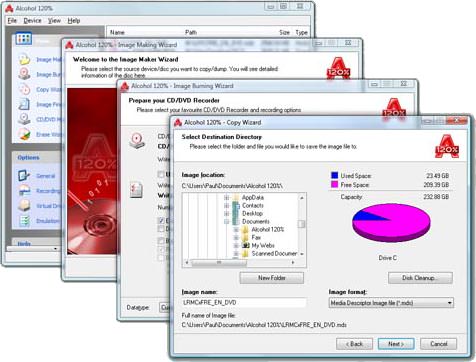
Software: Alcohol 120% 1.9.8 (Build 7612)


Iso Image Editor, Creator

Alcohol 120% can handle the creation of 31 virtual CD and DVD-ROMs, letting users play discs without needing the physical disc. Users can copy CDs and DVDs to CD-R, CD-RW, DVD-R, DVD+R, DVD-RW, DVD-RAM, and DVD+RW discs. The reading speed of a virtual CD-ROM is 200x. It supports normal CD, DVD, and CD RAW subchannel reading methods. The RAW reading method lets users emulate all CDs. Alcohol 120% supports numerous CD (CD-DA, CD+G, CD-ROM, CD-XA, VideoCD, Photo CD) and DVD (DVD-ROM, DVD-Video, DVD-Audio) formats. It also supports all current (ATAPI & SCSI) drives. The latest version adds two more profiles to the data type options and includes support for unusually formatted DVD+RW discs formatted by other software.


System Requirements:
OS: Windows Vista, XP

Note:
After Installation, go to language and set it to English (USA)

Downloads:
1- Alcohol 120% 1.9.8 (Build 7612) (Mediafire link) 11.49 MB
Download Software: Alcohol 120% 1.9.8 (Build 7612)

Software: Ashampoo Internet Accelerator 3


Instantly reveal your true surfing speed potential

We all take the Internet for granted nowadays but what your computer has to do to allow you to surf is actually amazingly complicated. Windows has a long list of settings for tuning the performance of your Internet connection. That’s fine if you’re a computer expert, the rest of us will generally make things worse rather than better – if we can find all the well-hidden settings in the first place. Ashampoo Internet Accelerator analyzes your computer and optimizes all the relevant settings with a single click. You don’t need to know anything, just select
the automatic optimizer and you’re done. The new version also includes an Internet connection speed test tool so you can test your performance directly.

In addition to automatic optimization advanced users can still access all the individual settings and adjust them manually.

Features:
1) Easier to use, plus new tools and settings
2) Internet Cleaner tool
3) Hosts File Checker
4) Interactive checking for key parameters
5) Automatic optimization for IE and Firefox

System Requirements:
OS: Windows Vista, XP

Download:
1- Trial/Buy (Ashampoo.com)
2- Ashampoo Internet Accelerator 3 + Keygen (Mediafire link) 9.48 MB
Download Software: Ashampoo Internet Accelerator 3

Software: Advance System Optimizer 2.20


Rated #1 for system utilities software

Advanced System Optimizer is the easiest and most comprehensive way to keep your PC running smooth and error free. The constant use of Windows, installing and removing new programmes, makes the working of windows slower. In many cases, performances of Windows goes down. Keeping this in mind, Advance System Optimizer 2.2 is a utility, that saves your system resources and optimizes the performance of your windows.

It cleans your hard disk files making your PC run better and faster without crashes. Registry cleaner to clear invalid registry entries. Registry defragger to fine tune your Windows System Registry. Privacy protector to clean internet history, cookies, cache, and any hidden tracks kept by Windows. System files backup and restore with single click.

System Requirements/ Note:
OS: Windows Vista (32-bit only), XP (32-bit only), 2003, 2000, NT4, Me, 98
Registration: (2-) Already registered under ASO retail version, so you don't need to register anymore.

Download:
Download Software: Advance System Optimizer 2.20

TuneUp Utilities 2009


Repairs, accelerates, cleans up! Complete optimization software for Windows Vista, XP, 2000.

Yours to choose:
Download TuneUp Utilities 2009