Showing posts with label blogging. Show all posts

Blogging: Unlimited Standalone Sitemap Generator 2.9


Having an XML sitemap for your site is an integral part of search engine optimization (SEO). By creating and submitting XML sitemaps you are more likely to get better freshness and coverage in search engines. Unlimited Sitemap Generator is an easy to install php script which is designed to run on the server that hosts your website.

Don't let your website get left behind - Improve your site's visibility in Google and other search engines by creating and submitting XML Sitemaps.

Features:
. It has no limits for the number of pages included in sitemap.
. It generates any kind of sitemap you require: XML, Text, HTML site maps.
. It will work for all sites including dynamic websites such as portals, blogs, forums, and . online stores.
. Fast and easy installation onto the same host that should be crawled.
. Support of LARGE websites, dividing the sitemap on the parts per 50,000 URLs each and creates a Sitemap Index file according to the Google sitemap protocol.
. Informs (ping) Google and other search engines automatically when sitemap generation is complete
. Any broken links that are detected by the application are reported on a special page, providing you with the URLs pages that refer to these bad links enabling you to fix them and keep the search engine robots on your site.
. Can be setup automatically with a cron job to create sitemaps without any user interaction

PS: If you are using blogger, you don't need to create the sitemap because blogger is using XML, and in fact they blogger.com submit the sitemap by itself: all automatic, unnoticeable in the background.

Sponsor:
1- sitemap generator, guide and more


Download:
1- Unlimited Standalone Sitemap Generator 2.9 (Mediafire)
Download Blogging: Unlimited Standalone Sitemap Generator 2.9

Blogger Template: Scrapbook


Feature:
* Cool Handycon icons (email, twitter, rss)
* Screen Wide view (looks like a magazine/pro)
* Artsy 5 Selected Post (thumbnail)
* Hidden (Hide/Unhide) Sidebar
* Built-in 'Go to top' ad 'Go to Footer' button

Sponsor:
1- Tons of other blog templates

Demo: Click Here Download: Here

Installation/How to use: Click Here

Download Blogger Template: Scrapbook

Blogger Tips: Submit Sitemap Solution for Blogger Blog


Everybody blogger more or less shall already heard about sitemap submission. If you already using Goole Webmster Tool, you blogspot blogger will already know how frustrating you are because blogger sitemap proved fail/no clue at all. However, that is not because the sitemap submit form is useless, but because you never know the correct procedure to submit your blogger sitemap. So below is the correct solution for you blogspot blogger.

All you need to do is:

1- Go to this Blogger Sitemap Generator
2- Place your full url of your desired blogger blog
3- Then Click 'Create Blogger Sitemap'
4- Your sitemap then will be generated instantly like below example:


5- Click the blue hyperlink texts to submit your sitemap to Yahoo! and Bing.

6- For Google, you need to log in to your Google Webmaster Tool, Select your blog that you want to submit the sitemap then click...

Site Configuration> Sitemaps> Submit a Sitemaps>


Place your generated sitemaps and click> Submit Sitemap. Done!

Sponsor:
1- Sitemap tricks books and software solution

That is it. All you need to makesure that your blog been crawled by those three major search engine. This procedure doesn't means that you will be on top of the search engine, but this is to makesure that those search engines able to indexes/crawls your hard work blog pretty fast.

Download Blogger Tips: Submit Sitemap Solution for Blogger Blog

Blogger Tips: Host Javascript inside Blogger

Well, when it comes to widget, you and i probably want something finest for the blog. Luckily Blogger allow it for as much as you desire to tweak everything yet, they don't give you the hosting for it. So, while there are so many free hosting out there, somebody must understand the external hosting sometimes not as much as promised. While blogger is okay, the hosting is down, or limited in bandwidth, or so slow to render the javascript and that means disaster when it comes to render andview your blog as smooth as it comes. That is not includes when somebody who hosting your whole blog script suddently closed down, hell that means all your script is gone by a split seconds and finding another seems much difficult. So here the trick for you:

Features:
1- Host your script inside blogger own hosting
2- It is 100% free
3- It gives you controll over your own script
4- Your blog takes the speed of the Blogger itself.
5- Unlimited storage
6- Unlimited bandwidth

1- Just use this simple code to place your whole precious javascript:
<script type='text/javascript'>
//<![CDATA[
PASTE
YOUR JAVASCRIPT CODE HERE
//]]>
</script>
2- Or here is some simple step tutorial. Let's say below is your java code:

<script type='text/javascript'>var thumbnail_mode =
&quot;float&quot; ;summary_noimg = 230;summary_img =
140;img_thumb_height = 170;img_thumb_width =
300;</script>
<script
src='http://keerthiset2.110mb.com/excerpt.js' type='text/javascript'/>
Note: Open the http://keerthiset2.110mb.com/excerpt.js (copy the whole thing) and that is the javascript code (this example) where you then require to replace it inside the default (number 1) code. Or below is the whole example of the javascript taken from that url.
function removeHtmlTag(strx,chop){
if(strx.indexOf("<")!=-1) { var s
= strx.split("<"); for(var
i=0;i<s.length;i++){
if(s[i].indexOf(">")!=-1){
s[i] =
s[i].substring(s[i].indexOf(">")+1,s[i].length);
} } strx =
s.join(""); } chop = (chop < strx.length-1)
? chop : strx.length-2; while(strx.charAt(chop-1)!=' ' &&
strx.indexOf(' ',chop)!=-1) chop++; strx = strx.substring(0,chop-1);
return strx+'...'; }
function createSummaryAndThumb(pID){ var div
= document.getElementById(pID); var imgtag = ""; var
img = div.getElementsByTagName("img"); var summ =
summary_noimg; if(img.length>=1) { imgtag =
'<span style="float:left; padding:0px 10px 5px
0px;"><img src="'+img[0].src+'"
width="'+img_thumb_width+'px"
height="'+img_thumb_height+'px"/></span>'; summ
= summary_img; } var summary = imgtag + '<div>' +
removeHtmlTag(div.innerHTML,summ) + '</div>'; div.innerHTML =
summary;}
3- Now, copy and paste the default script (number 1) into the add/remove element box. Replace the PLACE YOUR JAVASCRIPT CODE HERE with your own javascript eg: the above (number 2) script, so that it would looks like the below. Done.
<script type='text/javascript'>var thumbnail_mode =
&quot;float&quot; ;summary_noimg = 230;summary_img =
140;img_thumb_height = 170;img_thumb_width =
300;</script>
<script
type='text/javascript'>
//<![CDATA[
function
removeHtmlTag(strx,chop){if(strx.indexOf("<")!=-1){ var
s = strx.split("<"); for(var
i=0;i<s.length;i++){
if(s[i].indexOf(">")!=-1){ s[i] =
s[i].substring(s[i].indexOf(">")+1,s[i].length);
} } strx = s.join("");}chop = (chop <
strx.length-1) ? chop : strx.length-2;while(strx.charAt(chop-1)!=' '
&& strx.indexOf(' ',chop)!=-1) chop++;strx =
strx.substring(0,chop-1);return strx+'...';}
function
createSummaryAndThumb(pID){var div = document.getElementById(pID);var imgtag =
"";var img =
div.getElementsByTagName("img");var summ =
summary_noimg;if(img.length>=1) { imgtag = '<span
style="float:left; padding:0px 10px 5px
0px;"><img src="'+img[0].src+'"
width="'+img_thumb_width+'px"
height="'+img_thumb_height+'px"/></span>'; summ
= summary_img;}
var summary = imgtag + '<div>' +
removeHtmlTag(div.innerHTML,summ) + '</div>';div.innerHTML =
summary;}
//]]>
</script>
Download Blogger Tips: Host Javascript inside Blogger

Blogger Template: Gallery


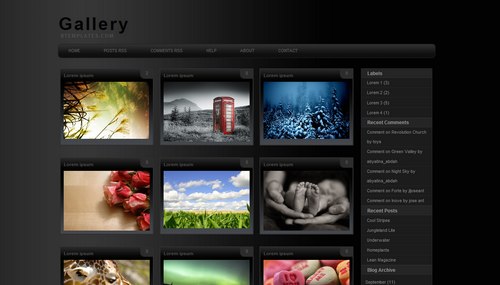
Highly customized photoblog, it display your nine photos in a page, and that goes for everything, including your recent post, labels, post search results, and more. It does include the built in labels, recent post, archieve, and 3-column footer. All automatic, you don't need to follow any standard code when posting. It display (on the index page) the thumbnail and comment count only no matter how long you post text goes on.

Sponsor:
1- Photography templates, blogs, camera and more

Demo: Click here Download: Click here

Download Blogger Template: Gallery

Blogger Template: Photoplus +


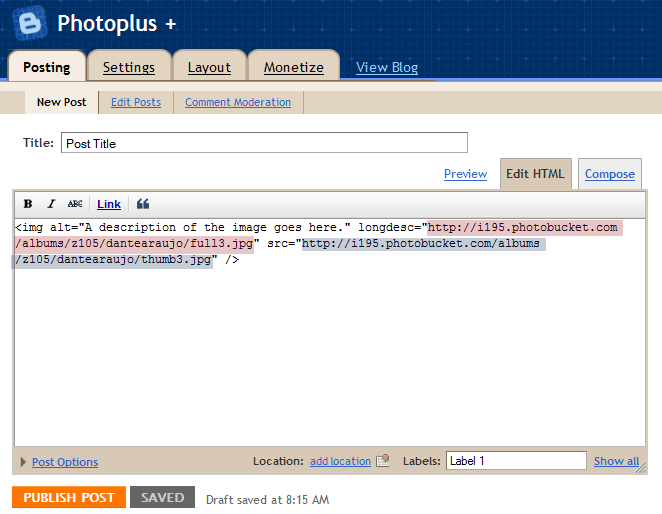
This template is for photography only, so if you need to show texts or anything else, It will not work. It serve only for thumbnail pictures which then clickable to see the original size/bigger pictures. No tittle will be shown, as the "alt" code for pictures will be used both for thumbnail description and seo@ search.

Features:
1- Photography
2- jQuery Special Feature
3- Web 2.0
4- Easy to customize
5- 3 Column Footer

How to post on photoplus?


Use this basic code for each time of posting:
<img alt="A description of the image goes here." longdesc="LINK_TO_THE_FULLSIZE_IMAGE" src="LINK_TO_THE_THUMBNAIL" />


Demo: Click here | Download: Click here

Download Blogger Template: Photoplus +

Automatic Post Summary with Thumbnail (Read More) (Blogger)


Tutorial:
1) Go To Layout> Edit Html> Backup your Template (Download Full Template)

Now the editing Begin:
2) Find this code
</head>
3) Replace the above code with this long code
<script type='text/javascript'>
var thumbnail_mode = &quot;float&quot; ;
summary_noimg = 230;
summary_img = 140;
img_thumb_height = 100;
img_thumb_width = 100;
</script>
<script src='http://blogergadgets.googlecode.com/files/excerpt.js' type='text/javascript'/>
</head>
4) Then please look for this code
<data:post.body/>
5) Overwrite the above code with the code below
<b:if cond='data:blog.pageType == &quot;item&quot;'>
<data:post.body/>
<b:else/>
<div expr:id='&quot;summary&quot; + data:post.id'>
<data:post.body/>
</div>
<script type='text/javascript'>
createSummaryAndThumb(&quot;summary<data:post.id/>&quot;);
</script>
<div style='clear: both;'/>
<span style='padding-top:5px;;float:right;text-align:right;'><a expr:href='data:post.url' rel='bookmark'><b>Read more >></b></a></span>
</b:if>
6) Preview> (if all the thing works fine then you can proceed) Save Template.

Note:
Using your own creativity, you can edit all those blue text, the text summary characters long 230 to anything longer/shorter, image width and height of 100 to 80, 70, or 120 or any size you want. Then, http://blogergadgets.googlecode.com/files/excerpt.js is your main javascript (without this script, your hack will 100% fail), you can open up the java, download it and host it into your own secure hosting directory. Finally, you can change that the above Read more >> to any other text you like (eg: more, read further, full text, etc).

Sponsor:
1- Blogging books, copywriting paperbacks and more
Download Automatic Post Summary with Thumbnail (Read More) (Blogger)

Blogging Tool: AllWebMenus Pro 5.1.766


DHTML menu, Javascript menu and CSS menu builder that requires no programming

AllWebMenus Pro lets you design attractive menus and maps for your sites with minimal effort. The host of parameters for customizing keeps you from repeating yourself. The interface is clear and helpful. The program generates on the fly the navigable preview of the menu you are designing. It lets you quickly try several variants and choose the best. The menu items are organized into a tree. You can edit a parameter for several items at once and change styles from one submenu to another. The program has an extensive manual that explains every parameter. You can choose from more than 100 preset design styles and save your own to use later. Finally, the program links the menu into your Web pages. AllWebMenus Pro is a real godsend to Webmaster.

Features:
* Cross browser support
* Improved Interface
* Allow the use of your own html code for maximum enhancement
* Sliding menus
* Vertical scrollbar
* Horizontal menus
* Menus effects
(Read here)

System Requirements:
OS: Windows Vista, XP, 98, Me, NT

Sponsor:
1- All web menus, dhtml, html, xhtml, css and more

Download:
1- AllWebMenus Pro 5.1.766 (Mediafire link)

Download Blogging Tool: AllWebMenus Pro 5.1.766

Webware: CSS Menu Maker

Create CSS Menu without any CSS knowledge

CSSMenuMaker.com is here to provide the average webmaster with tools to create custom, cross browser compatible website menus. Our menu generator makes it easy to create custom CSS menus without having to know all the complicated HTML and CSS. If you are a more experienced web developer we provide the sources code for all our CSS menus so that you can download, tweak, and integrate as much as you want. Feel free to use our CSS menu generator an unlimited amount of times. The only thing that we ask is if you find this site useful, help us spread the word by linking to us or bookmarking us with digg.com or del.icio.us.


Sponsor:
1- CSS, HTML, XHTML, Web, Blog learning books and more

Webware:
1- CSS Menu Maker (CSSmenumaker.com)

Download Webware: CSS Menu Maker

SNS E-book: 3 Big Ways To Monetize Social Media


Monetize without pissing everybody off

You can make money with social media. I’m PROOF! I make an absolutely ridiculous amount ever month with Twitter, Facebook, YouTube and the other social media platforms but…

SAD FACT: 99% Marketers will NEVER make a nickel in social media and you never will either unless you pay close attention right now. So why can’t even seasoned marketers seem to make money using social media? Simply put, it’s because they ARE seasoned. They’re all stuck in a rut and using old and out-of-date techniques that simply don’t work in this brand new marketplace.

The fact is, EVERYTHING in social media is different. They don’t understand the basic principles and unwritten rules that govern this space. But I do. Look…

For the last year I have had my nose buried in social media. Twitter, Facebook, YouTube etc…80 hours a week or more, studying, testing analyzing trends and data and… In That Time I Have Built a True ARMY of 130,000 Supporters & Fans…FREE! Over 100,000 followers on Twitter alone plus 30,000 more on sites like Facebook, YouTube and MySpace. ALL FOR FREE! This has done THREE big things for me… (This is an excerp only: Get this ebook for the whole story)

Sponsor:
1- Social Media, ebooks and more

Download:

1- 3 Big Ways To Monetize Social Media (.PDF)(SocialMEdiaMoneySystem.com)

Download SNS E-book: 3 Big Ways To Monetize Social Media

Blog Widget: Photo Widget (Wordpress)


Floating Photo thumbnail Widget

This is a cool photo widget package equipped with it XML and java code, build by the official wordpress licensed Flickr photo widget creator. But this one is not for the Flickr, it retrieve any photos from any site/blog including your own. Crawl up to 20 random photos per session, this widget is kind of awesome. The thumbnail image is clickable and may go to the original image source post.

Features:
* Let’s you display any images you want
* Uses a custom XML format, from a configurable URL
* Images can be loaded from any website, including your own
* Links and target frames can be set per image in the XML
* Available for download, including code examples
* Up to 20 images shown simultaniously
* Open source (GPL)

Sponsor:
1- Cool blog widgets, themes and more

Download:
1- Photo Widget (Roytanck.com) or get it from the original page here.


Download Blog Widget: Photo Widget (Wordpress)

SNS: Addatweet


Solving comments problem

Practically useful when you found an interesting post on online newspapers or any other web page but you are about to spend a long time enough just to sign up and post a single line of comment. That is no fun and because of that, so many interesting posts left without comments. So, Addatweet solve this problem by come up with a browser version of comment box, and using a universally well known twitter, many people will sure have no problems on commenting anymore.


Features:

* Browser comment box using twitter
* Placed well on right or left of your browser
* No need for multiple accounts, twitter does it all
* Comments on any pages you like and all your comments will be saved like forever.

System requirements:
Browser: Firefox 3.0 or higher

Download:
1- Addatweet (Addatweet.com)
Download SNS: Addatweet

Blog widget: Jingle Me

Cellular social networking made easy

This is a widget for blogs, friendster, LinkIn, Myspace and Facebook user. Sign up, get the scripts emailed to you and paste your script into your blog and you are ready to Jingle. This works for free and but the bad news is this service is only available for north america demographic area. This service is free, works fine for your blog user to call you (at your set time) for free and best of all, you don't need to expose your phone number. Pretty much useful for bloggers who provide services that need the power of communicating more than just text and chat.


Widget: Click here and go to Jingle Me.
Download Blog widget: Jingle Me

Blog Reference: Blogging On My Mind


Worth reading

Thinking of various ways of blogging, the techniques told and the various possible options written may redefine your blogging behavior. At least, for certain point of views, and after a while of reading this e-book, I then brough into the 'world of casual', where those stresses and those aims of blogging never give up you againts your life. Packed with fresh up-to-date blogging medium, this blog gain it credit more than others, it give you an option to donate for charity. So, if you do love what you read, mind to donate.


Features:
* What Is A Blog, Getting Started ( Free Blog Hosting Services/ Paid Blog Hosting Services)
* Why I Chose Wordpress
* Blogging Essentials
* Social Networking
* Blog Tips ( Consistency, Networking, Relating To Readers, Video Posts)
* Designing Your Blog
* Branding
* Monetizing Your Blog (Monetizing Tips, Monetizing Options)
* Donate: Read here

Ebook information:
Author: Nabil Khan
Pages: 62
Release: 2008

Download:
1- Blogging On My Mind (Enkayblog.com)
Download Blog Reference: Blogging On My Mind

Blog Widget: Searchles Related Contents Widget


Contextual related post widget

The free plug-and-play Related Content Widget from Searchles displays your site's contextually relevant content next to your articles to engage readers to further explore content on your website.

Features:
* Powered by intelligent search technology
* Works for Blogger, Wordpress, TypePad, Drupal, and more.
* Make money from targeted ad revenue
* Customizable to your site


Get widget: Click and get your Searchles Related Content widget here.
Download Blog Widget: Searchles Related Contents Widget

Blog Reference: 101 Steps To Becoming A Better Blogger


A Step by Step System to Success

This e-book is broken into sections, which are then broken down into chapters. I have organized the information contained to be as up-to-date and as detailed as possible. The information generally moves from least complex to most complex, so if you are a newbie, definitely start at the beginning of this book. If you are a more experienced blogger, use the Table of Contents to determine where you should begin your reading. Being a better blogger is not necessarily about how much money you make with your blog, but how well you communicate through your writing and observations. The blogging platform (software) used in this e-book is WordPress, which is free and open source. You will want to check WordPress’ requirements for your webhost, to make sure you can run the software with no problems. If you do not have a webhost, I highly recommend BlueHost, which is the hosting service I use. All of the other software and websites mentioned in this guide are also free, or have decent free versions. Links provided to other websites are current at the time of publishing, and we hold no responsibility for the content therein.

Feature:
1- Basic about better blogging
2- Momentum keeping
3- Plugins and how to use it in optimal
4- Readers, getting readers and blog personalizing
5- Blog functionality, tweaks, Writing tricks

Download:
1- 101 Steps on Becoming Better Blogger (Mediafire link)607 KB
Download Blog Reference: 101 Steps To Becoming A Better Blogger

Twitter Reference: Mastering Twitter in 10 minutes

Basic twitter guide

This ebook is not worth of reading since the content just tell you what is twitter, step by step guide to sign up your twitter account and no secret reveals. However, I scanned through and found out that, without this ebook, maybe somebody new to twitter could possibly takes some time in exploring the few features for this service. This ebook (either you read it words by words or scan it fast down from above to bottom) may help you explore twitter in the blink of eyes/faster even before you sign up for the service.

Features:
1- Twitter introduction and why using twitter
2- Twitter interface, all function explained, using twitter every features
3- Few service eg: invite, twitter search and twitter user timeline

Download:
1- Mastering Twitter (Mediafire link) 1.37 MB
Download Twitter Reference: Mastering Twitter in 10 minutes

Software: Free Script Editor 3.0

Create, edit, view, edit again, view again just by using tabbed page.

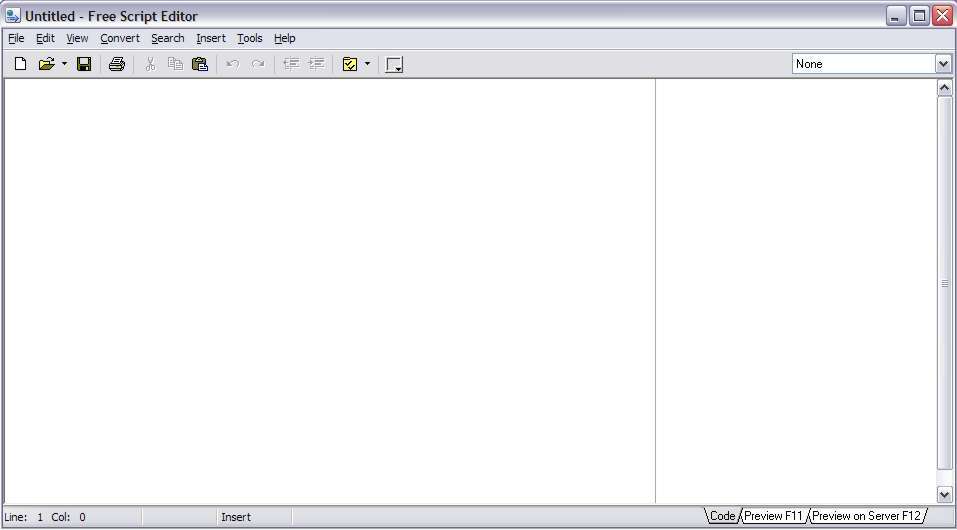
Like this free html/script editor very much. It is like an advanced wordpad or notepad that allow you to have a very much pages using tabbed view like Excell or Access program. Moreover, the tabbed view function allow me to edit and view the results while in editing process(without the need to save), which you simply can't do that on any blogger 'create new post' page. Also, it support scripting, so I simply can develop my own script with ease, have an integrated color picker - it lets you get the color HTML code from any point of the screen and insert it into the editor. This is an almost complete freeware and if you are not happy or looking for more complex function, you can ask them to develop your need for the latter release of the software.

Features:
* Color picker
* Unlimited "Undo" and "Redo" function
* Printing preserving syntax highlighting
* The integrated TiDy library for HTML code formatting and validation, and converting the code into CSS, XML, and XHTML
* Integration with Total Commander and WinScp – it will let you make Free Script Editor the default editor in these programs
*The possibility of making Free Script Editor an HTML editor in IE
* The possibility of setting Free Script Editor as View Source Editor for IE, Firefox and Opera
* Export into RTF, HTML or the buffer preserving the syntax highlighting
* Column highlighting mode (on pressing the Alt key)
* Tab support – tabs will let you quickly navigate between code members. Up to 10 tabs are supported in every document.
* Text to HTML converter and many more.


Download:
1- Free Script Editor (FreeScriptEditor.org)
2- Free Script Editor 3.0 (Mediafire link) in progress...
Download Software: Free Script Editor 3.0

Blog Reference: How to Bookmark for Free Web Traffic


Social bookmark for traffic

Are you bookmarking web that you like? If yes, end user just do the bookmark for nothing but web owner really need those action, to promote their blog to a greater extent, elsewhere away from their blog, circulating their names from one person to an other person. This is an art of 'mouth to mouth' advertising done by the manual action of their unique visitors. So? You are also a blog/web owner? Now is your time to dive yourself into this secret of free advertising yet effective. Social bookmark for traffic give you an overall insight about the introductory, benefits, what to avoid and easy to follow how to manual.

Features:
1- Social bookmark intoduction (Internet/social)
2- Basic of social bokmarking
3- Using Social Bookmarking For Your Website or Weblog
4- How to Make Social Bookmarking Work For You
5- Social Bookmarking Sites To Try
6- The Top Rated Social Bookmarking Websites
7- Using Your Social Bookmarks to the Fullest

Note:
Pages: 36

Download:
1- How to Bookmark for Free Web Traffic (ArticleWritingSecrets.net)
2- How to Bookmark for Free Web Traffic (Mediafire link) 92.88 KB
Download Blog Reference: How to Bookmark for Free Web Traffic

Blog Reference: Blogger Magic Professional User Guide

The simple idea sometimes works best

I Know that this is not a complete package, this is a small .pdf file tuning a few technique on blogging. What impress me a lot is, I have no clue at all when reading those words. Comments? Comment box? Inbound outound links? However thanks to the conclusion, now I know something really helpful when it comes to help my blog get traffic to maximum. At least the idea is there. Worth reading (the conclusion part).


Download:

1- Blogger Magic Professional User Guide (MagicProfessional.com) 865 KB
Download Blog Reference: Blogger Magic Professional User Guide