Showing posts with label blogging tool. Show all posts

Blogging: Unlimited Standalone Sitemap Generator 2.9


Having an XML sitemap for your site is an integral part of search engine optimization (SEO). By creating and submitting XML sitemaps you are more likely to get better freshness and coverage in search engines. Unlimited Sitemap Generator is an easy to install php script which is designed to run on the server that hosts your website.

Don't let your website get left behind - Improve your site's visibility in Google and other search engines by creating and submitting XML Sitemaps.

Features:
. It has no limits for the number of pages included in sitemap.
. It generates any kind of sitemap you require: XML, Text, HTML site maps.
. It will work for all sites including dynamic websites such as portals, blogs, forums, and . online stores.
. Fast and easy installation onto the same host that should be crawled.
. Support of LARGE websites, dividing the sitemap on the parts per 50,000 URLs each and creates a Sitemap Index file according to the Google sitemap protocol.
. Informs (ping) Google and other search engines automatically when sitemap generation is complete
. Any broken links that are detected by the application are reported on a special page, providing you with the URLs pages that refer to these bad links enabling you to fix them and keep the search engine robots on your site.
. Can be setup automatically with a cron job to create sitemaps without any user interaction

PS: If you are using blogger, you don't need to create the sitemap because blogger is using XML, and in fact they blogger.com submit the sitemap by itself: all automatic, unnoticeable in the background.

Sponsor:
1- sitemap generator, guide and more


Download:
1- Unlimited Standalone Sitemap Generator 2.9 (Mediafire)
Download Blogging: Unlimited Standalone Sitemap Generator 2.9

Blogging Tool: AllWebMenus Pro 5.1.766


DHTML menu, Javascript menu and CSS menu builder that requires no programming

AllWebMenus Pro lets you design attractive menus and maps for your sites with minimal effort. The host of parameters for customizing keeps you from repeating yourself. The interface is clear and helpful. The program generates on the fly the navigable preview of the menu you are designing. It lets you quickly try several variants and choose the best. The menu items are organized into a tree. You can edit a parameter for several items at once and change styles from one submenu to another. The program has an extensive manual that explains every parameter. You can choose from more than 100 preset design styles and save your own to use later. Finally, the program links the menu into your Web pages. AllWebMenus Pro is a real godsend to Webmaster.

Features:
* Cross browser support
* Improved Interface
* Allow the use of your own html code for maximum enhancement
* Sliding menus
* Vertical scrollbar
* Horizontal menus
* Menus effects
(Read here)

System Requirements:
OS: Windows Vista, XP, 98, Me, NT

Sponsor:
1- All web menus, dhtml, html, xhtml, css and more

Download:
1- AllWebMenus Pro 5.1.766 (Mediafire link)

Download Blogging Tool: AllWebMenus Pro 5.1.766

Webware: CSS Menu Maker

Create CSS Menu without any CSS knowledge

CSSMenuMaker.com is here to provide the average webmaster with tools to create custom, cross browser compatible website menus. Our menu generator makes it easy to create custom CSS menus without having to know all the complicated HTML and CSS. If you are a more experienced web developer we provide the sources code for all our CSS menus so that you can download, tweak, and integrate as much as you want. Feel free to use our CSS menu generator an unlimited amount of times. The only thing that we ask is if you find this site useful, help us spread the word by linking to us or bookmarking us with digg.com or del.icio.us.


Sponsor:
1- CSS, HTML, XHTML, Web, Blog learning books and more

Webware:
1- CSS Menu Maker (CSSmenumaker.com)

Download Webware: CSS Menu Maker

SNS: Addatweet


Solving comments problem

Practically useful when you found an interesting post on online newspapers or any other web page but you are about to spend a long time enough just to sign up and post a single line of comment. That is no fun and because of that, so many interesting posts left without comments. So, Addatweet solve this problem by come up with a browser version of comment box, and using a universally well known twitter, many people will sure have no problems on commenting anymore.


Features:

* Browser comment box using twitter
* Placed well on right or left of your browser
* No need for multiple accounts, twitter does it all
* Comments on any pages you like and all your comments will be saved like forever.

System requirements:
Browser: Firefox 3.0 or higher

Download:
1- Addatweet (Addatweet.com)
Download SNS: Addatweet

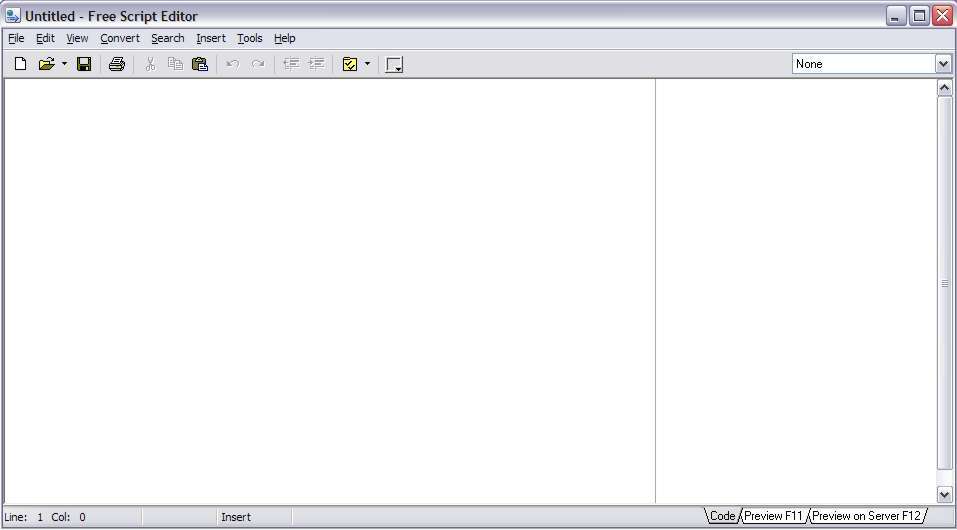
Software: Free Script Editor 3.0

Create, edit, view, edit again, view again just by using tabbed page.

Like this free html/script editor very much. It is like an advanced wordpad or notepad that allow you to have a very much pages using tabbed view like Excell or Access program. Moreover, the tabbed view function allow me to edit and view the results while in editing process(without the need to save), which you simply can't do that on any blogger 'create new post' page. Also, it support scripting, so I simply can develop my own script with ease, have an integrated color picker - it lets you get the color HTML code from any point of the screen and insert it into the editor. This is an almost complete freeware and if you are not happy or looking for more complex function, you can ask them to develop your need for the latter release of the software.

Features:
* Color picker
* Unlimited "Undo" and "Redo" function
* Printing preserving syntax highlighting
* The integrated TiDy library for HTML code formatting and validation, and converting the code into CSS, XML, and XHTML
* Integration with Total Commander and WinScp – it will let you make Free Script Editor the default editor in these programs
*The possibility of making Free Script Editor an HTML editor in IE
* The possibility of setting Free Script Editor as View Source Editor for IE, Firefox and Opera
* Export into RTF, HTML or the buffer preserving the syntax highlighting
* Column highlighting mode (on pressing the Alt key)
* Tab support – tabs will let you quickly navigate between code members. Up to 10 tabs are supported in every document.
* Text to HTML converter and many more.


Download:
1- Free Script Editor (FreeScriptEditor.org)
2- Free Script Editor 3.0 (Mediafire link) in progress...
Download Software: Free Script Editor 3.0

Webware: Embedit.in

Lets display any file onto your website

If you are an advance searcher on the net, you may already see an informational related websites that could show you lets say .pdf files, .txt files, .ppt files etc. Like google books as an example. Here is your chance to do exactly the same, you can upload your documents from your computer or from the your document url on net into the Embedit.in and there you go the next step on embedding those files onto your own web or blog. Now, document sharing is much easier. Now, displaying your files for other people to read directly from your web page need no html, xhtml etc. coding expertise anymore. Also, there is a download button will appear just below those files embedded, hence your visitors can download your files; which also means when you display your files, makesure you are totally willing to share those files as well - everything in Embedit.in is open to public. This tool is pretty much handy.


Embedit.in supports most common file types:
* Documents: doc, docx, xls, xlsx, ppt, pptx, pdf, wpd, odt, ods, odp
* Images: png, jpg, gif, tiff, bmp, eps, ai
* Text: txt, rtf, csv

Note:
Embedit.in use flash to dispay your file, with support for up to 20MB per file upload, and all Embedit.in uploaded files can be viewed, downloaded, printed, shared.

Webware link:
Download Webware: Embedit.in

Webware: Google Adwords Keyword Tool


Keyword research and optimization that really work

As you already realize, good contents sometimes just get untouched and unseen, not because of your bad or grammatically incorrect problem in language, but sometimes it is just a matter of blog search engine optimization setting and keyword. Have a blog is not just about writing, if you want to be reachable and famous, keyword need more than just fill in the blank, it need research and experience. Here here Google Adwords Keyword tool may help you. It is awesome since the tool rank the keywords by popularity, frequency and also include suggestion for your keywords. Free, easy to use and as what everybody looking for; doing the keyword research the
smart way.

How To Do Keyword Research With Google Adwords Keyword Tool? Learn the video tutorial below and have an insight into it.


Here is the visual example for the keyword research result using Goole Adwords: Keyword Tool. It show an important items including CPC, keyword competition, estimated price for individual keywords, popularity (or difficulty or competition pool) and also grouped the keywords all into obvious group, so you can estimate your keyword need and selectively target your own niche blogging.


Webware:
Download Webware: Google Adwords Keyword Tool