Everybody blogger more or less shall already heard about sitemap submission. If you already using Goole Webmster Tool, you blogspot blogger will already know how frustrating you are because blogger sitemap proved fail/no clue at all. However, that is not because the sitemap submit form is useless, but because you never know the correct procedure to submit your blogger sitemap. So below is the correct solution for you blogspot blogger.
All you need to do is:
1- Go to this Blogger Sitemap Generator 2- Place your full url of your desired blogger blog 3- Then Click 'Create Blogger Sitemap' 4- Your sitemap then will be generated instantly like below example:
5- Click the blue hyperlink texts to submit your sitemap to Yahoo! and Bing.
6- For Google, you need to log in to your Google Webmaster Tool, Select your blog that you want to submit the sitemap then click...
Site Configuration> Sitemaps> Submit a Sitemaps>
Place your generated sitemaps and click> Submit Sitemap. Done!
That is it. All you need to makesure that your blog been crawled by those three major search engine. This procedure doesn't means that you will be on top of the search engine, but this is to makesure that those search engines able to indexes/crawls your hard work blog pretty fast.
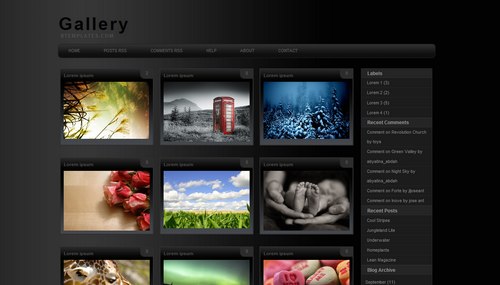
Highly customized photoblog, it display your nine photos in a page, and that goes for everything, including your recent post, labels, post search results, and more. It does include the built in labels, recent post, archieve, and 3-column footer. All automatic, you don't need to follow any standard code when posting. It display (on the index page) the thumbnail and comment count only no matter how long you post text goes on.
This template is for photography only, so if you need to show texts or anything else, It will not work. It serve only for thumbnail pictures which then clickable to see the original size/bigger pictures. No tittle will be shown, as the "alt" code for pictures will be used both for thumbnail description and seo@ search.
Features: 1- Photography 2- jQuery Special Feature 3- Web 2.0 4- Easy to customize 5- 3 Column Footer
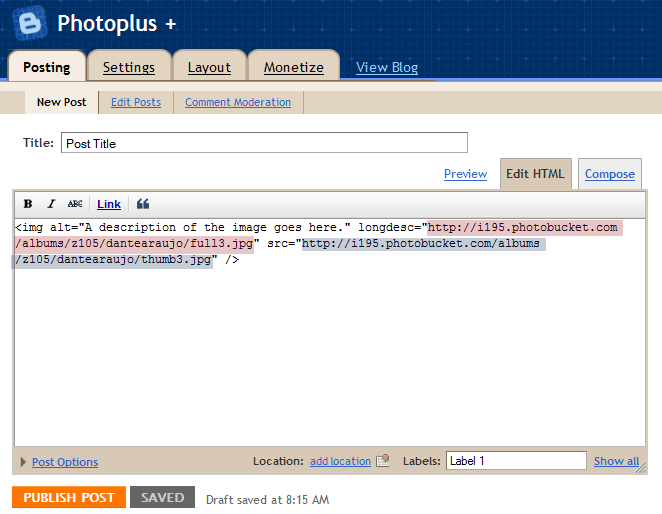
How to post on photoplus?
Use this basic code for each time of posting:
<img alt="A description of the image goes here." longdesc="LINK_TO_THE_FULLSIZE_IMAGE" src="LINK_TO_THE_THUMBNAIL" />
A great resource for those who are interested in learning blogging
Takes a reader through the history of blogging, what is a blog and blogger, how to choose goals and blog topics, a domain name, dashboard usage and configuration/templates. Blogging etiquette and secrets for success, how to promote blog, search engines, social networking, mobile blogging, podcast, video blogging, Picasa, Youtube, Feedburner, and monetization.